
The Rust world seed controls the procedural map layout, while world size controls how large that map is. Larger Rust maps use more RAM, CPU, and disk space, so raise world size carefully and upgrade your server resources if the server starts running out of memory.

  1. Open your Rust server in the control panel.
  2. Click Backup Server and wait for the backup to finish.
  3. Click Configuration Files.
  4. Find server.cfg, then click Config Editor.
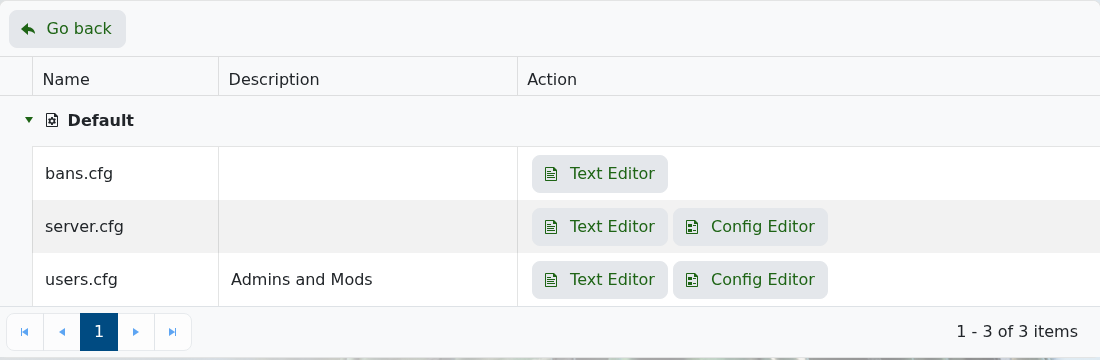
    Rust Configuration Files showing server.cfg Config Editor

  5. Change World Seed if you want a different procedural layout.
  6. Change World Size if you want a larger or smaller map. Rust accepts 1000 to 6000; larger maps use more RAM, disk, and CPU.
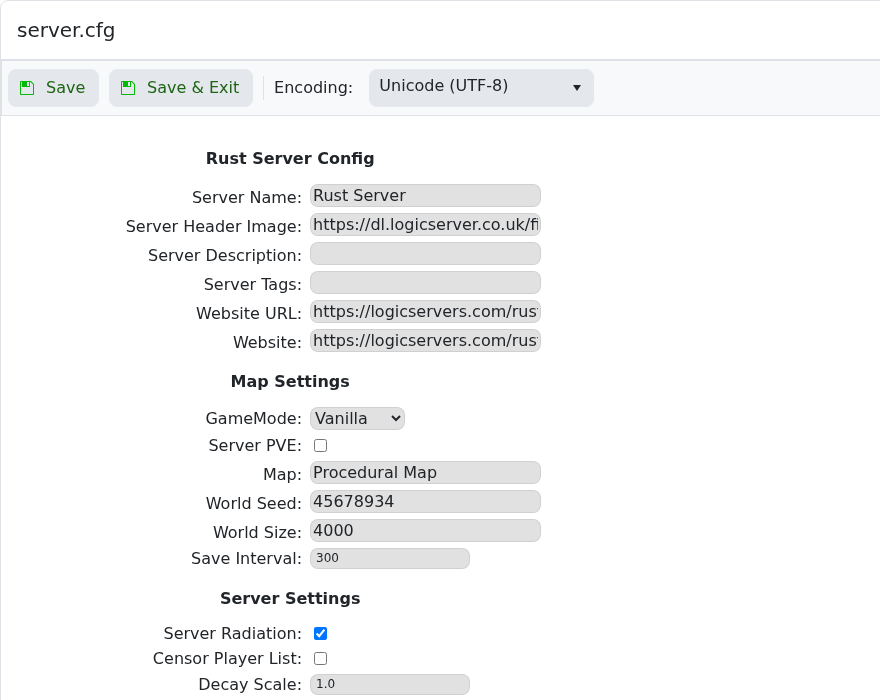
    Rust server.cfg Config Editor showing World Seed and World Size

  7. Click Save & Exit.
  8. Wipe the current map using Wiping the world of your Rust server.
  9. Start the server.

If the server runs out of memory after increasing world size, upgrade the server RAM from the client area or submit a support ticket and we can check the best upgrade size for your map and player count.


  • 0 Bu dökümanı faydalı bulan kullanıcılar:
Bu cevap yeterince yardımcı oldu mu?

İlgili diğer dökümanlar

Making yourself admin on a Rust Server

Rust admin access lets a trusted player run server commands, moderate players, save/write config...

How to join a Rust Server

Use the server address from your control panel to join your Rust server. This guide uses...

Installing Rust: IO on your Rust Server

Rust:IO is an older mapping/plugin ecosystem for Rust servers. On our Rust panel, Rust:IO is...

Wiping the world of your Rust server

Wiping and resetting a Rust server are the same basic workflow: remove the current saved data so...

Creating a custom command line for your Rust server

Rust command lines control startup-only options such as RCON, WebRCon, logs, map size, save...
