Restore a Palworld backup when you need to roll the server back after a bad update, broken mod install, unwanted config change, or world issue. Restoring replaces current files with the selected backup.

  1. Open your Palworld server in the control panel.
  2. Stop the server.
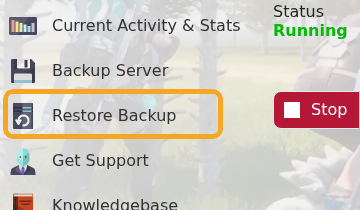
  3. Click Restore Backup.

    Palworld control panel showing Restore Backup

  4. Select the backup you want to restore from the dropdown.

    Palworld Restore Backup dropdown

  5. Tick Are you sure?.
  6. Click Execute and wait for the restore task to finish.
  7. Start the server and test the world.

If you are restoring because of a failed mod or config change, do not reinstall the same files again until you know what caused the issue. After the restore, check Web Console or Log Viewer if the server does not start normally.


  • 1 istifadəçi bunu faydalı hesab edir
Bu cavab sizə kömək etdi?

Uyğun məqalələr

What are the admin commands for a Palworld server

Palworld admin commands let you save the world, broadcast messages, kick or ban players,...

How to ban or unban players on your Palworld server

Ban disruptive players by using the in-game admin command or by adding their SteamID to the...

Adding a password to your Palworld Server

Add a server password when you want your Palworld server to be private or limited to invited...

How to edit the Configuration Files on your Palworld server

Most Palworld server settings are changed from PalWorldSettings.ini. Use Config Editor for common...

How to join a Palworld server

Use the Palworld multiplayer menu to search for your server by name, or use direct connect with...