
Some servers, plugins, and mods need a MySQL database to store data. You can create one from the Databases page on the Ptero control panel.
Create the database
- Open your server in the Ptero control panel, then open Databases.
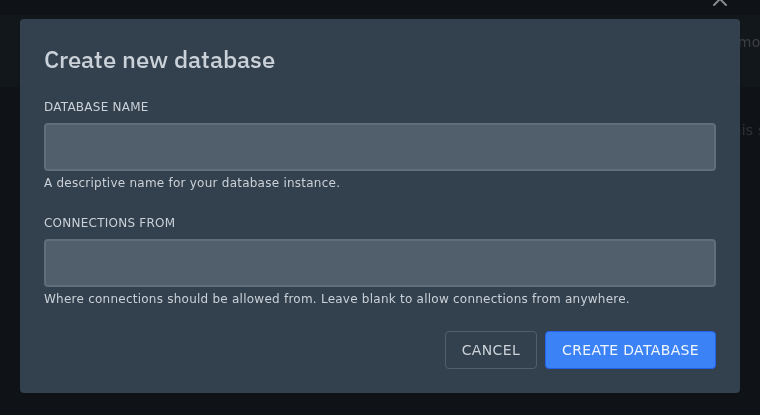
- Click New Database.

- Enter a Database Name. Use something short that makes sense for the plugin, mod, or server feature that will use it.
- Usually, you can leave Connections From empty. The panel will then show
%, which means connections are allowed from anywhere. If you want to limit access, enter the IP addresses, hostnames, or wildcard patterns that should be allowed, separated by commas. For example, you could use a pattern such as127.0.0.%. - Click Create Database.
- Your new database will appear on the Databases page. Click the eye icon next to the database when you need to view its connection details.
Find the connection details
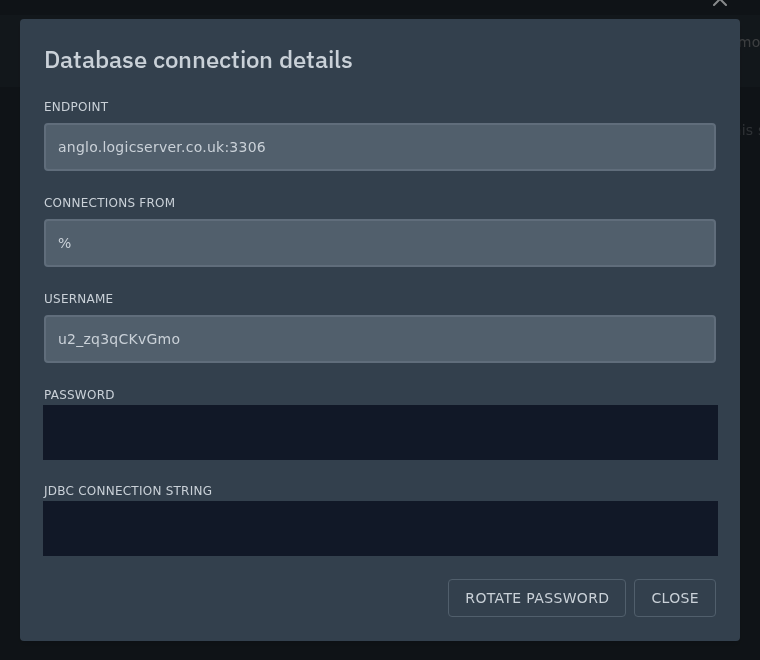
Click the eye icon next to the database to view the full connection details. This is where you can find the database password.
The endpoint is shown as host:port. For example, anglo.logicserver.co.uk:3306 means the host is anglo.logicserver.co.uk and the port is 3306. Use those separately if your plugin or mod asks for a host and port in different boxes.
You can also rotate your database password from this screen if you need to replace it. After rotating the password, update any plugin, mod, or server config that uses the old password.
Use phpMyAdmin
You can open phpMyAdmin by clicking the phpMyAdmin icon next to the database.
We have a separate guide for that here: How to access phpMyAdmin for your Ptero database.


