Fabric and Quilt are lightweight Minecraft mod loaders. Use Fabric for Fabric mods, and use Quilt when the mod or modpack specifically requires Quilt.

Install Fabric or Quilt

  1. Open your Minecraft server in the control panel, stop the server, and take a backup before changing server software.
  2. Open Versions from the left menu.
  3. Find Fabric or Quilt, then click the install icon on the right of the card.
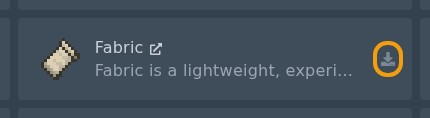
    Fabric installer card with the install icon highlighted

    Quilt installer card with the install icon highlighted

  4. Select the Minecraft version required by your mods or modpack.
  5. Do not check the Delete files box unless you want to wipe your server.
  6. Click Install software, wait for the installer to finish, then restart the server once so the folders are created.

After Fabric or Quilt is installed, upload your mod files to the mods folder. See: How to install mods on your Minecraft server.


  • 0 用戶發現這個有用
這篇文章有幫助嗎?

相關文章

Colour Codes for Minecraft Multiplayer and Vanilla

This article lists all of the codes you can use with many plugins in Minecraft using Spigot or...

What is the difference between Fabric, Quilt and Forge in Minecraft Modding

Exploring the Distinctions Between Fabric and Forge When diving into the exciting world of...

What is a Grindstone and how is it used?

In this guide, we will teach you what the Grindstone in Minecraft does, and how to use it...

How to Convert Java and Bedrock Edition Worlds

In this guide, we’ll be teaching you how to convert your world from a Java Edition world to a...

Minecraft's New Version Numbers

Minecraft has changed how its version numbers work from 2026 onwards. Instead of carrying on with...