
Icarus DLC worlds are chosen from inside the game when you create a prospect. There is not a separate DLC install button in the control panel; the server just needs to be updated and the player creating the prospect needs access to the DLC in their Icarus client.
- Update the server first so it has the latest Icarus dedicated server files. See How to Update your Icarus server.
- Open your Icarus server in the control panel and click Configuration Files.
- Open
ServerSettings.iniwith Config Editor, then enable Allow Anyone to Launch Prospects if the player creating the DLC prospect is not an admin.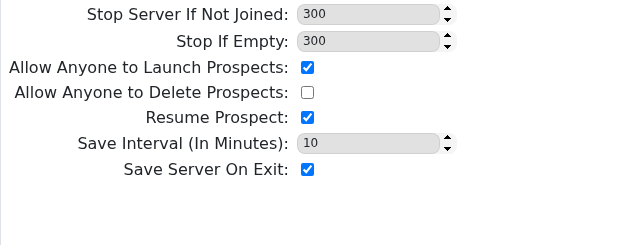
- Click Save & Exit, then start or restart the server.
- Open Icarus on your PC and join the dedicated server.
- Open the prospect setup screen and choose to create a new prospect.
- Select the DLC map or DLC mission you want to run. If the DLC map is not shown, check that the player creating the prospect owns or has access to that DLC on their PC.
- Choose the prospect options you want, then launch the prospect.
- After the prospect has launched, leave Resume Prospect enabled so the server continues that DLC prospect after restarts.
If the DLC still does not appear after updating the server and checking the client DLC, submit a support ticket with the DLC name and the map or prospect you are trying to start.


