
Join your Icarus dedicated server from inside Icarus using the server name shown in the control panel. If the server has a password, players will need that password before joining.

  1. Open your Icarus server in the control panel.
  2. Make sure the server is Running. The panel also shows the server name, owner, players, and connection information.
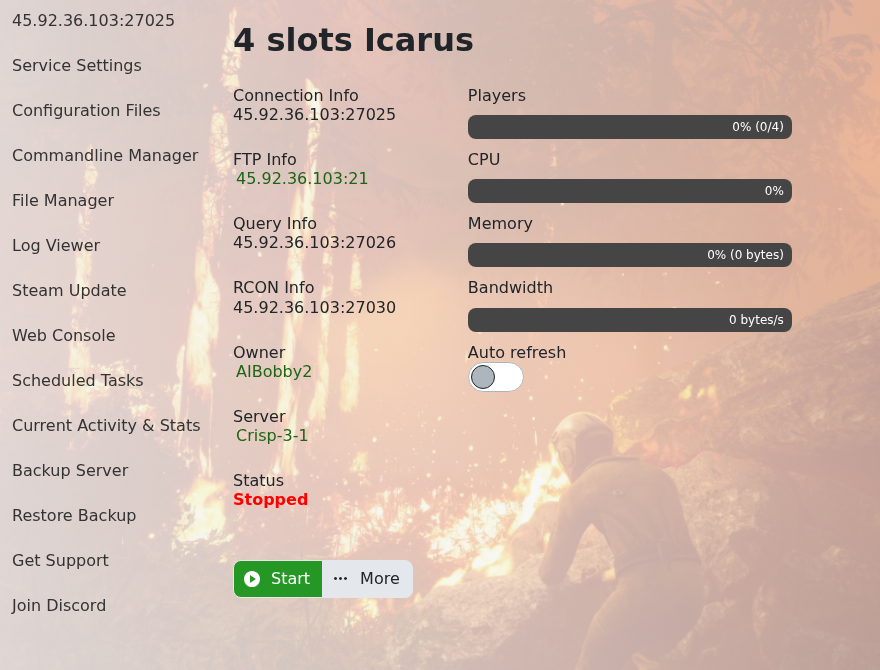
    Icarus control panel home page

  3. Open Icarus on your PC.
  4. Open the in-game server browser or dedicated server list.
  5. Search for the server name shown in the control panel.
  6. Select the server, enter the server password if one is set, then join.

If the server does not appear, check that it is online, the server name is correct, and the game has finished refreshing the server list. If you still cannot find it, submit a support ticket and include the server name you are searching for.


  • 0 کاربر این را مفید یافتند
آیا این پاسخ به شما کمک کرد؟

مقالات مربوطه

How to backup your Icarus Server

ICARUS is a PvE survival game for up to eight players. Explore a savage wilderness in the...

How to change the password your Icarus Server

Prevent unwanted players joining your Icarus Server by putting a password on it, then give that...

How to Update your Icarus server

How to Update your Icarus server ICARUS is a PvE survival game for up to eight players. Explore...

How to change the name of your Icarus server

How to change the name of your Icarus server ICARUS is a PvE survival game for up to eight...

How to create a world on your Icarus server

Icarus worlds are created as prospects. On a dedicated server, the usual flow is to join the...
