
Restoring a backup replaces the current V Rising server files with the files from the backup you select. Use this when you need to roll back after a bad update, setting change, save upload, or wipe.

  1. Open your V Rising server in the control panel.
  2. Stop the server.
  3. Click Restore Backup on the left side menu.
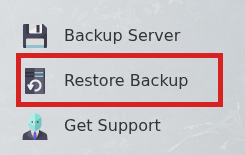
    V Rising control panel showing Restore Backup

  4. Select the backup you want to restore.
  5. Tick Are you sure?, then click Execute.
  6. Wait for the restore task to finish, then start the server.

If you are not sure which backup to restore, submit a support ticket before running the restore.

  • 0 Kasutajad peavad seda kasulikuks
Kas see vastus oli kasulik?

Seotud artiklid

How to Update your V Rising Server

Awaken as a weakened Vampire after centuries of slumber. Hunt for blood to regain your strength...

How to change the name on your V Rising Server

Awaken as a weakened Vampire after centuries of slumber. Hunt for blood to regain your strength...

How to change the password on your V Rising server

Awaken as a weakened Vampire after centuries of slumber. Hunt for blood to regain your strength...

How to Backup your V Rising Server

Awaken as a weakened Vampire after centuries of slumber. Hunt for blood to regain your strength...

How to find and join your V Rising server

You need the server address from the control panel before joining your V Rising server. If the...

