Use Steam Update when Project Zomboid releases a server update or when your client can no longer connect because the server is behind. Take a backup first if you have active saves or modded settings.

  1. Open your Project Zomboid server in the control panel.
  2. Click Backup Server and wait for the backup to finish.
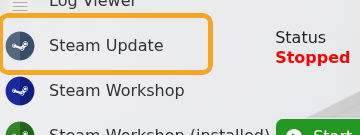
  3. Click Steam Update.

    Project Zomboid Steam Update button

  4. Wait for the Steam update task to complete.
  5. Start the server and check Web Console for startup errors.

If you use Workshop mods, check whether any mod updates are also required after the server update.


  • 0 Utilizadores acharam útil
Esta resposta foi útil?

Artigos Relacionados

How to install mods on a Project Zomboid server

Project Zomboid Workshop mods need two values from the Steam Workshop page: the Workshop ID and...

Installing Map Mods on Your Project Zomboid Server

Project Zomboid map mods usually need three values from the Workshop page: Workshop ID, Mod ID,...

Project Zomboid Admin Commands Guide

Project Zomboid admin commands can be run in-game by an admin account or from the server console....

Making yourself Admin on your Project Zomboid Server

Making yourself Admin on Your Project Zomboid Server This guide will walk you through the...

How to run Unstable B42 Multiplayer on your Project Zomboid Server

Project Zomboid Build 42 now includes multiplayer support. You can install it on your Project...