
Use the server.bat Config Editor to set or change the Valheim join password. Valheim passwords must be long enough to be accepted by the game, so avoid very short passwords.

  1. Open your Valheim server in the control panel.
  2. Click Configuration Files.
  3. Open server.bat with Config Editor.
  4. Enter the new value in Server Password.
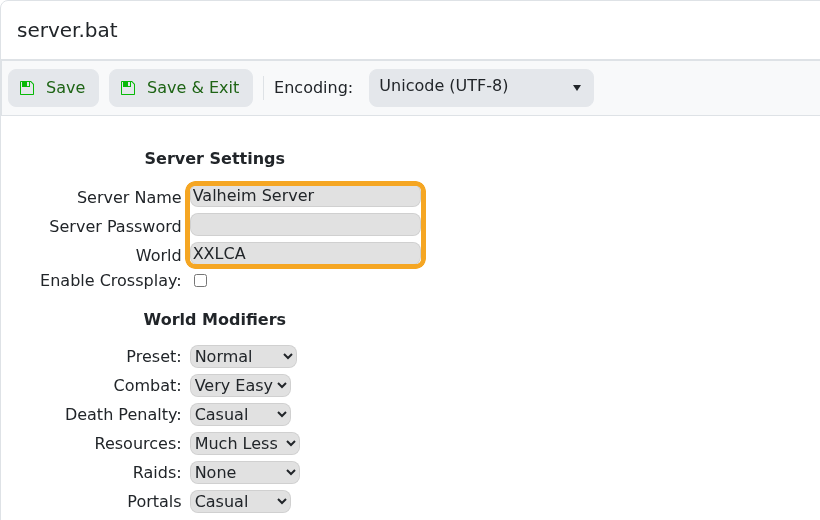
    Valheim server.bat Config Editor showing server password

  5. Click Save & Exit.
  6. Restart the server and give players the new password.

If players still see the old password behaviour, confirm they are joining the correct IP and that the server restarted after the change.


  • 1 Utilizadores acharam útil
Esta resposta foi útil?

Artigos Relacionados

Changing the name of your Valheim Server

The Valheim server name is stored in the server settings file. Change it from the server.bat...

Changing the world that your Valheim Server loads

The Valheim World field tells the server which world save to load. The value must match the world...

How to upload a world to your Valheim Server

Upload a Valheim world when you want your server to run a world from your own PC or another...

How to make yourself admin on a Valheim Server

Valheim server admins are listed in adminlist.txt. Add your SteamID64 to that file, save it, then...

How to join a Valheim Server

Join your Valheim server with the address shown as Connection Info in the control panel. Valheim...
