
Palworld admin commands let you save the world, broadcast messages, kick or ban players, teleport, and shut the server down from inside the game. Set an admin password first, then use /AdminPassword in-game to unlock the commands.
- Open your Palworld server in the control panel.
- Click Configuration Files.
- Open
PalWorldSettings.iniwith Config Editor. - Set a private Admin Password.
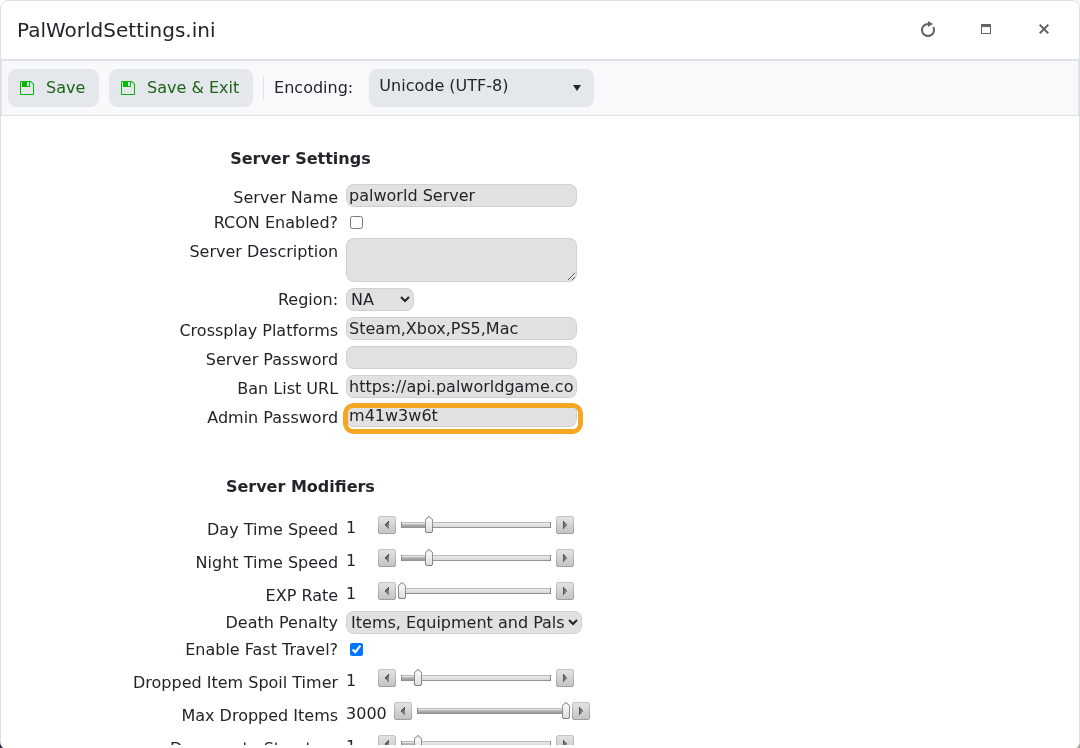
- Click Save & Exit, then restart the server.
- Join the server and type this in chat, replacing the example password with your own:
/AdminPassword YourAdminPassword
- Run admin commands from in-game chat after the password is accepted.
| Command | What it does |
|---|---|
/Info | Shows server information. |
/Save | Saves the world. |
/Broadcast Message | Sends a message to everyone. |
/ShowPlayers | Lists connected players and identifiers. |
/KickPlayer SteamID | Kicks a player. |
/BanPlayer SteamID | Bans a player. |
/TeleportToPlayer SteamID | Teleports you to a player. |
/TeleportToMe SteamID | Teleports a player to you. |
/Shutdown Seconds Message | Shuts the server down after a delay. |
/DoExit | Immediately stops the server. |
Use /ShowPlayers before kick, ban, or teleport commands so you copy the correct identifier. Keep the admin password private.


