
Open your server in the control panel, then go to Settings. Under SFTP Details, the panel will show the Server Address and Username you need to use, the password is the same as the one you use to login to our control panel.

The Server Address includes the SFTP host and port. If your FTP client asks for a port separately, you do not enter the sftp:// part, then you split it at the colon. In the image below the IP and Port separated becomes IP/Hostname anglo.logicservers.co.uk and port 8022.
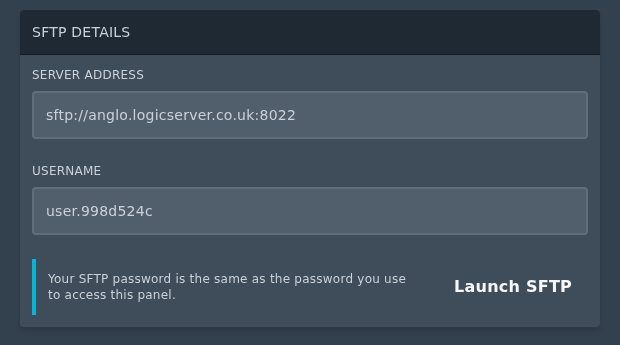
SFTP details section on the Ptero settings page

Once you have the Server Address and Username, you can then follow this guide to connect with FileZilla: How to connect to SFTP using FileZilla or use an SFTP client of your choice. 

  • 0 Bu dökümanı faydalı bulan kullanıcılar:
Bu cevap yeterince yardımcı oldu mu?

İlgili diğer dökümanlar

Setting up Scheduled Tasks in TCAdmin

Log into your control panel. Enter Schedule Tasks, create a new one and choose the...

How to add sub-users in TCAdmin

Log into TCAdmin. Enter Sun Users, found under User Management. Select new, and in...

How to Increase how many players can join your Minecraft Server or Game Server

Expanding server slots is a key step in enhancing your game server's capacity, allowing more...

How to Report Abuse on Services Hosted by LogicServers

At LogicServers, we prioritize maintaining a safe and secure online environment for all our...

Feedback and Complaints Submission

We strive to provide the best service possible, we can only improve on our services with valid...

