
We recommend using FileZilla for SFTP, which can be downloaded here: https://filezilla-project.org/

If you are connecting to a Ptero server, you can find the SFTP server address and username here: How to access SFTP on our Ptero control panel.

Connect using Site Manager

  1. Open FileZilla.
  2. Go to File > Site Manager at the top of the window.
  3. Click New Site.
  4. Set Protocol to SFTP.
  5. Enter the host and port from your control panel's SFTP details.
  6. Select Normal in the Logon Type dropdown.
  7. Enter your SFTP username.
  8. Enter your control panel password.
  9. Click Connect, and your server files should appear.

Site Manager example:
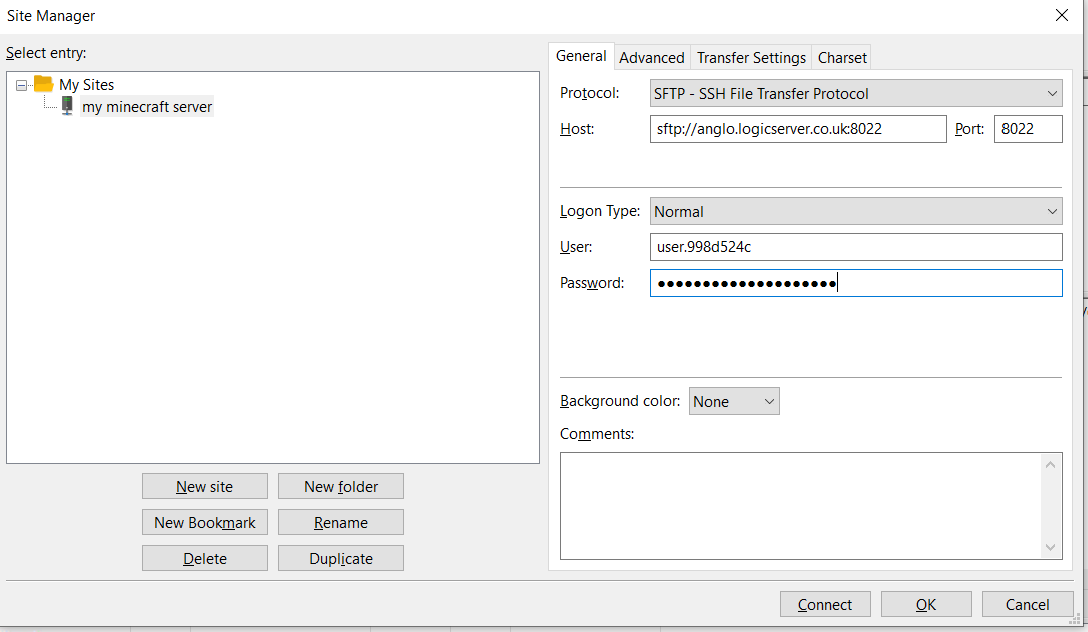
FileZilla Site Manager SFTP connection details

Use Quickconnect

For a faster connection, you can use Quickconnect by entering the host, username, password, and port into the Quickconnect bar.


FileZilla Quickconnect SFTP connection details

  • 0 Utilizadores acharam útil
Esta resposta foi útil?

Artigos Relacionados

Setting up Scheduled Tasks in TCAdmin

Log into your control panel. Enter Schedule Tasks, create a new one and choose the...

How to add sub-users in TCAdmin

Log into TCAdmin. Enter Sun Users, found under User Management. Select new, and in...

How to Increase how many players can join your Minecraft Server or Game Server

Expanding server slots is a key step in enhancing your game server's capacity, allowing more...

How to Report Abuse on Services Hosted by LogicServers

At LogicServers, we prioritize maintaining a safe and secure online environment for all our...

Feedback and Complaints Submission

We strive to provide the best service possible, we can only improve on our services with valid...

