
Dragonwilds worlds are stored in the server save files. To switch worlds, upload or restore the save you want the server to use.

Switch to another world

  1. Take a backup of the current server.
  2. Stop the server.
  3. Open File Manager.
  4. Go to RSDragonwilds > Saved > SaveGames.
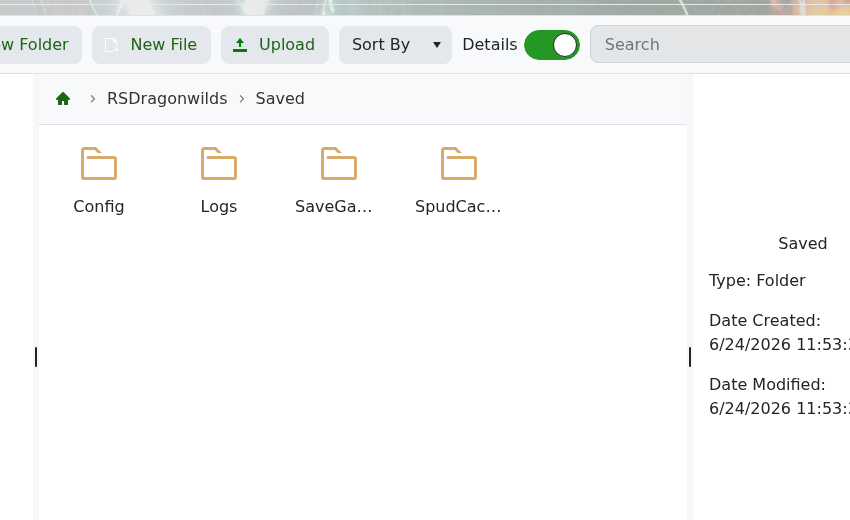
    Dragonwilds Saved folder with SaveGames

  5. Upload or restore the world save you want to use.
  6. Start the server again.

Keep the old world backed up until you have checked that the new world loads correctly.

  • 0 Uživatelům pomohlo
Byla tato odpověď nápomocná?

Související články

How to backup your Dragonwilds Server

Dragonwilds servers include scheduled backups, but it is still worth taking a manual backup...

How to restore your Dragonwilds Server from a backup

You can restore a Dragonwilds backup if a setting change, mod install, update, or world change...

How to join a Dragonwilds Server

You can find your Dragonwilds server connection details on the server home page in the control...

How to Change Your Dragonwilds Username

Dragonwilds player names are handled by the game client rather than the server control panel. If...

Dragonwilds Server RAM Recommendations

The right RAM amount for a Dragonwilds server depends on player count, world activity, mods, and...

