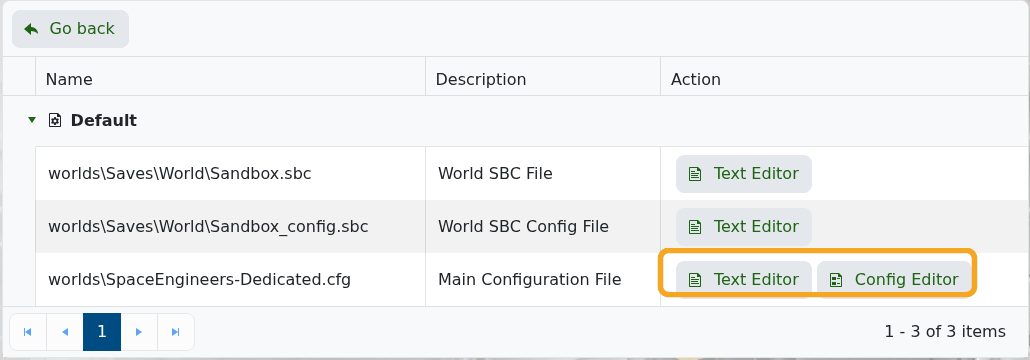
Most common Space Engineers server settings are in worlds\SpaceEngineers-Dedicated.cfg. Use the Config Editor for standard fields like server name, description, world name, autosave interval, whitelist group, and common gameplay toggles.

Edit Server Settings

  1. Open your Space Engineers server in the control panel.
  2. Click Configuration Files.
  3. Open worlds\SpaceEngineers-Dedicated.cfg with Config Editor.

    Space Engineers Configuration Files showing Config Editor

  4. Change the fields you need. For example, Host Name controls the server name and World Name controls the active save.
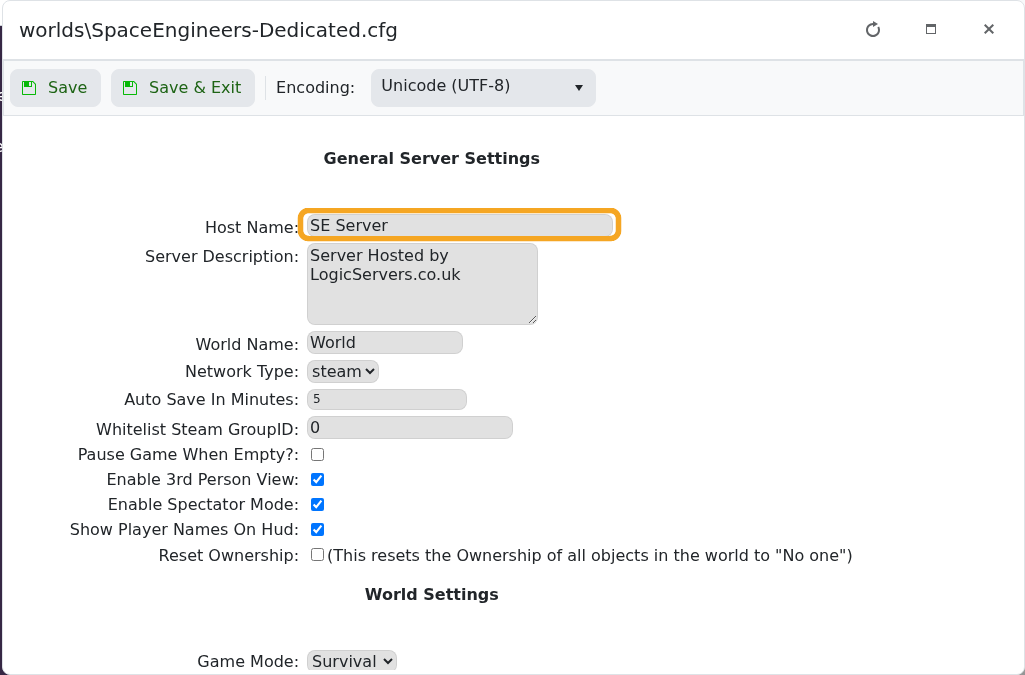
    Space Engineers Config Editor showing Host Name

  5. Click Save & Exit.
  6. Restart the server so the new settings are applied.

Some advanced save-specific settings are stored in the world SBC files. Back up the server before editing those manually.


  • 0 användare blev hjälpta av detta svar
Hjälpte svaret dig?

Relaterade artiklar

Uploading a Space Engineers world to your server

Upload a Space Engineers world when you want to move a single-player or locally hosted save onto...

Wiping the world of your Space Engineers server

Wiping a Space Engineers server removes selected server data so the server can start fresh....

How to join a Space Engineers server

You can join a Space Engineers server by using the connection address from your control panel....

Adding Group Whitelist in Space Engineers

Space Engineers whitelisting is handled with a Steam group. When a Steam Group ID is set, only...

Adding Yourself as an Admin in Space Engineers

Space Engineers admins can use the in-game admin tools to manage players, entities, trash...