
You can join your Arma 3 server by using the connection address from your control panel. Arma 3 servers normally use the game port shown in Connection Info, for example 45.92.36.105:2312.

  1. Open your Arma 3 server in the control panel.
  2. Copy the address under Connection Info.
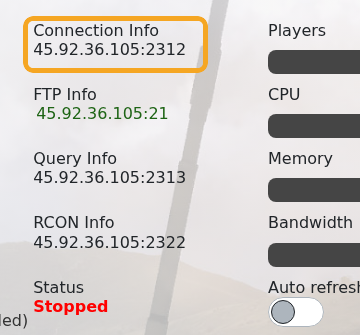
    Arma 3 control panel showing Connection Info

  3. Open Arma 3 on your PC.
  4. Open the multiplayer server browser.
  5. Search for your server name, or use direct connect with the IP and port from the panel.
  6. Enter the server password if one is configured, then join.

If the server uses mods, make sure your client has the same required mods enabled before joining. If the server browser does not show every mod, check ARMA3 Server mods not showing on game launcher.


  • 0 Os usuários acharam isso útil
Esta resposta foi útil?

Artigos Relacionados

Adding and running a mission on your Arma 3 server

Arma 3 multiplayer missions are usually uploaded as .pbo files into the MPMissions folder. After...

Installing workshop mods to your ARMA 3 server

Install Arma 3 Workshop mods from the control panel, then make sure the server command line loads...

ARMA3 Server mods not showing on game launcher

If Arma 3 launcher only shows some of your server mods, the server may not be sending enough mod...

How to add creator DLCs to an Arma3 server

Some Arma 3 Creator DLC content needs dedicated server files and a matching startup parameter...

How to update your Arma 3 server

Use Steam Update when Arma 3 releases a dedicated server update or when your game client reports...
