
The Arma 3 server name and join password are stored in server.cfg. The easiest way to change them is through the Config Editor, then restart the server so the new values are loaded.

  1. Open your Arma 3 server in the control panel.
  2. Click Configuration Files.
  3. Find server.cfg, then click Config Editor.
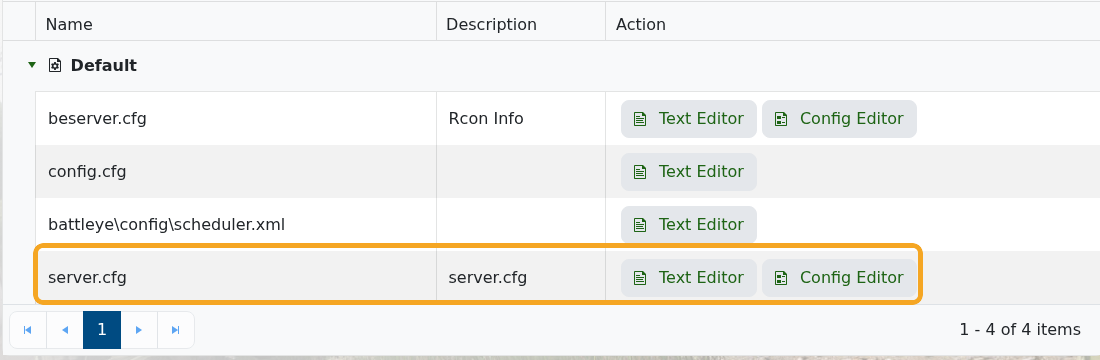
    Arma 3 Configuration Files showing server.cfg

  4. Change Server Name and Server Password as needed.
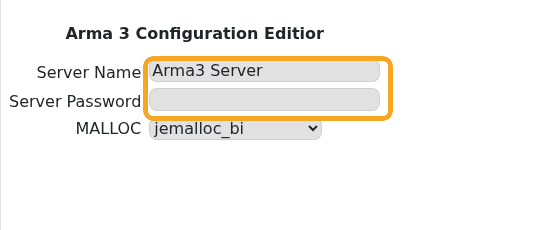
    Arma 3 server.cfg Config Editor showing server name and password

  5. Click Save & Exit.
  6. Restart the server.

Leave the server password blank if you want the server to be public. Use a password when you want a private training, unit, or event server where only invited players can join. If players still see the old name in the browser after a restart, wait a few minutes and refresh the server list.


  • 0 användare blev hjälpta av detta svar
Hjälpte svaret dig?

Relaterade artiklar

Adding and running a mission on your Arma 3 server

Arma 3 multiplayer missions are usually uploaded as .pbo files into the MPMissions folder. After...

Installing workshop mods to your ARMA 3 server

Install Arma 3 Workshop mods from the control panel, then make sure the server command line loads...

ARMA3 Server mods not showing on game launcher

If Arma 3 launcher only shows some of your server mods, the server may not be sending enough mod...

How to add creator DLCs to an Arma3 server

Some Arma 3 Creator DLC content needs dedicated server files and a matching startup parameter...

How to join an Arma 3 server

You can join your Arma 3 server by using the connection address from your control panel. Arma 3...
