
Restore a backup when you need to roll back after a broken update, bad JSON edit, unwanted scenario change, or failed mod setup. Restoring replaces the current server files with the selected backup.

  1. Open your Arma Reforger server in the control panel.
  2. Stop the server.
  3. Click Restore Backup from the left side menu.
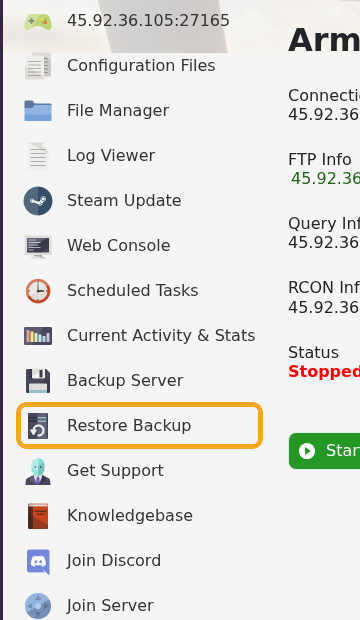
    Arma Reforger control panel showing Restore Backup

  4. Select the backup you want to restore from the dropdown.
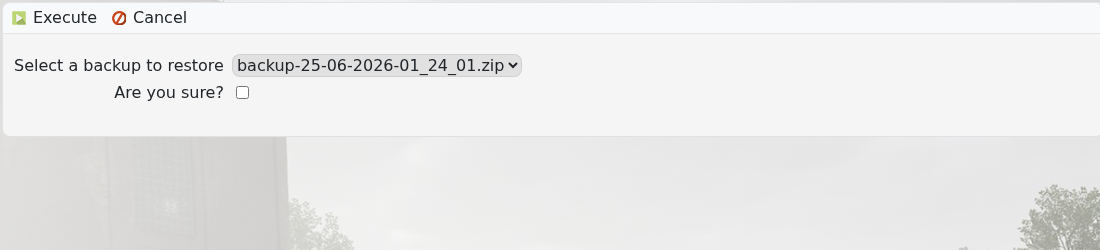
    Arma Reforger Restore Backup page showing backup dropdown and confirmation checkbox

  5. Tick Are you sure?, then execute the restore and wait for the task to finish.
  6. Start the server and check it loads correctly.

If the server still fails after restoring, submit a support ticket and include the backup name you restored.


  • 0 Kasutajad peavad seda kasulikuks
Kas see vastus oli kasulik?

Seotud artiklid

How to join an Arma Reforger server

You can join your Arma Reforger server by using the server address shown in your control panel....

How to update your Arma Reforger server

Use Steam Update when Arma Reforger releases a server update or when your client reports that the...

How to backup your Arma Reforger server

Create a backup before changing scenarios, editing server_config.json, adding mods, changing RCON...

How to change your Arma Reforger server name and password

The Arma Reforger server name and password are stored in server_config.json. Use the Config...

How to change Arma Reforger server_config.json settings

Most Arma Reforger server behaviour is controlled by server_config.json. Use the Config Editor...
