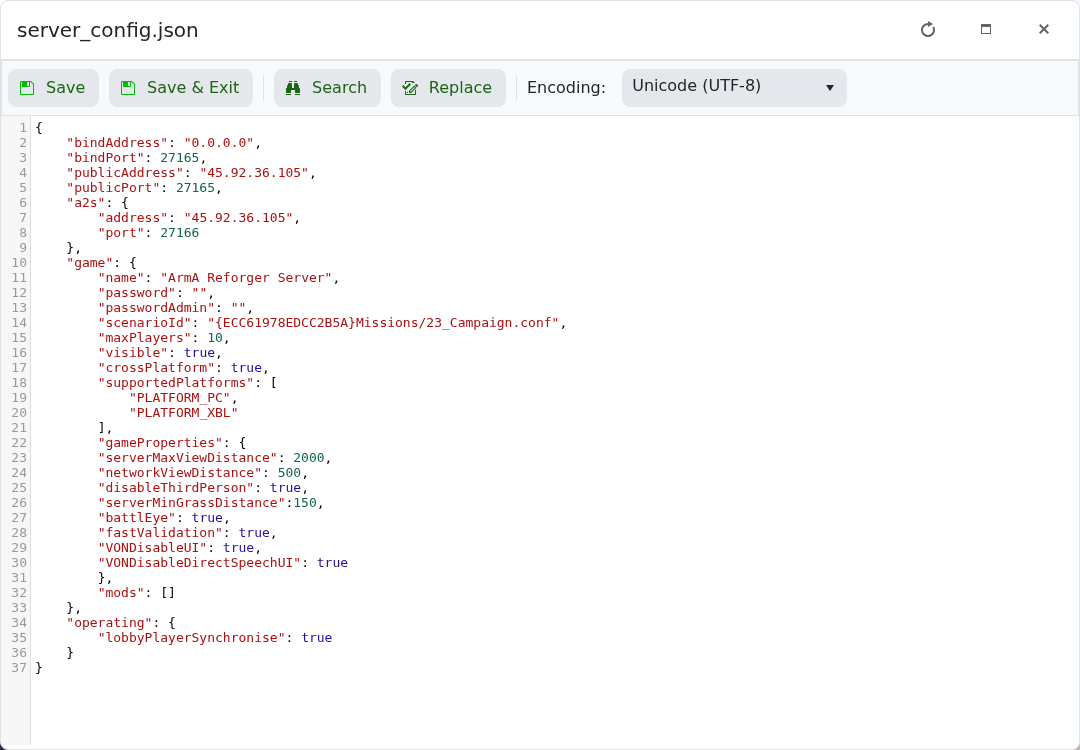
Arma Reforger crossplay is controlled in server_config.json. The important values are game.crossPlatform and game.supportedPlatforms.

  1. Open your Arma Reforger server in the control panel.
  2. Click Configuration Files.
  3. Open server_config.json with Text Editor.

    Arma Reforger server_config.json Text Editor showing crossPlatform and supportedPlatforms

  4. Set crossPlatform to true or false.
  5. Set supportedPlatforms to the platforms you want to allow.
  6. Click Save & Exit, then restart the server.

Example with PC and Xbox enabled:

"crossPlatform": true,
"supportedPlatforms": [
    "PLATFORM_PC",
    "PLATFORM_XBL"
]

If you only want PC players, remove the Xbox entry and set crossplay according to the behaviour you want for your community.


  • 0 Los usuarios encontraron esto útil
¿Le ha resultado útil esta respuesta?

Artículos relacionados

How to join an Arma Reforger server

You can join your Arma Reforger server by using the server address shown in your control panel....

How to update your Arma Reforger server

Use Steam Update when Arma Reforger releases a server update or when your client reports that the...

How to backup your Arma Reforger server

Create a backup before changing scenarios, editing server_config.json, adding mods, changing RCON...

How to restore a backup on your Arma Reforger server

Restore a backup when you need to roll back after a broken update, bad JSON edit, unwanted...

How to change your Arma Reforger server name and password

The Arma Reforger server name and password are stored in server_config.json. Use the Config...