
Arma Reforger uses an admin password in server_config.json. Set this to a private value and only share it with trusted admins.

  1. Open your Arma Reforger server in the control panel.
  2. Click Configuration Files.
  3. Open server_config.json with Config Editor.
  4. Enter a private value in Admin Password.
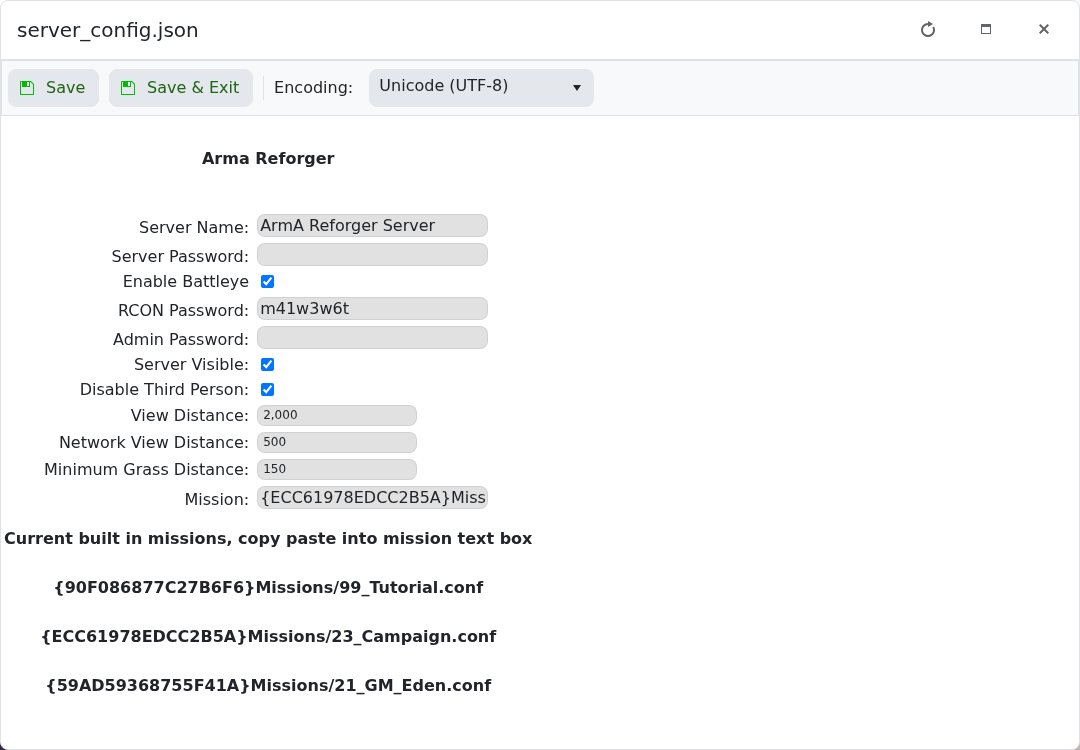
    Arma Reforger Config Editor showing Admin Password

  5. Click Save & Exit.
  6. Restart the server.

Use a different value from the normal server password. If you edit with Text Editor instead, the JSON field is game.passwordAdmin.


  • 0 A felhasználók hasznosnak találták ezt
Hasznosnak találta ezt a választ?

Kapcsolódó cikkek

How to join an Arma Reforger server

You can join your Arma Reforger server by using the server address shown in your control panel....

How to update your Arma Reforger server

Use Steam Update when Arma Reforger releases a server update or when your client reports that the...

How to backup your Arma Reforger server

Create a backup before changing scenarios, editing server_config.json, adding mods, changing RCON...

How to restore a backup on your Arma Reforger server

Restore a backup when you need to roll back after a broken update, bad JSON edit, unwanted...

How to change your Arma Reforger server name and password

The Arma Reforger server name and password are stored in server_config.json. Use the Config...
