
Scheduled restarts help keep long-running Arma Reforger servers stable and give players a predictable maintenance window. Use the Scheduled Tasks area to create a restart task at a quiet time.

  1. Open your Arma Reforger server in the control panel.
  2. Click Scheduled Tasks from the left side menu.
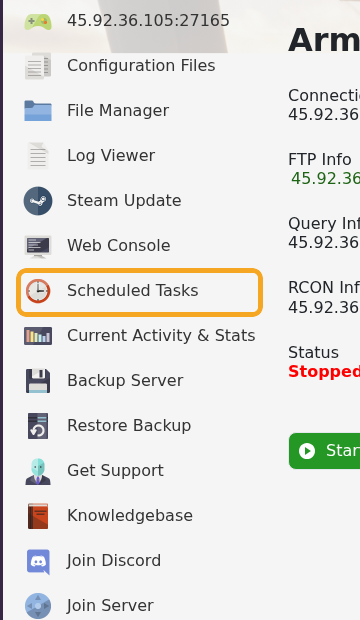
    Arma Reforger control panel showing Scheduled Tasks

  3. Click New above the task list.

    Arma Reforger Scheduled Tasks list showing New button

  4. Set Task Type to Scheduled Start/Stop/Restart, then click [ New ].

    Arma Reforger Scheduled Tasks type set to Scheduled Start Stop Restart

  5. On the Restart Schedule tab, give the task a clear name, such as Daily restart or Fortnightly restart, and leave Enabled ticked.
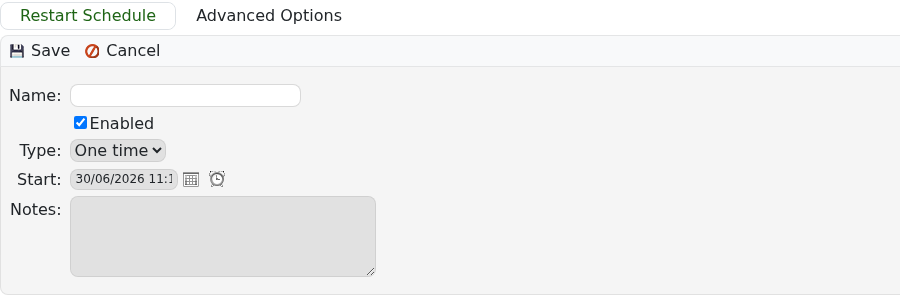
    Arma Reforger Scheduled Tasks Restart Schedule form

  6. Set the first Start date and time. Pick a quiet time for your main player region.
  7. Set Type to Daily for an every-day restart, or Weekly if you want a weekly or two-week maintenance pattern.
  8. Save the task.
  9. Return to Scheduled Tasks and check the Next Run Time so you know when the restart will happen.

If you run a public server, tell players when the restart normally happens so they can avoid losing progress during active sessions.


  • 0 A felhasználók hasznosnak találták ezt
Hasznosnak találta ezt a választ?

Kapcsolódó cikkek

How to join an Arma Reforger server

You can join your Arma Reforger server by using the server address shown in your control panel....

How to update your Arma Reforger server

Use Steam Update when Arma Reforger releases a server update or when your client reports that the...

How to backup your Arma Reforger server

Create a backup before changing scenarios, editing server_config.json, adding mods, changing RCON...

How to restore a backup on your Arma Reforger server

Restore a backup when you need to roll back after a broken update, bad JSON edit, unwanted...

How to change your Arma Reforger server name and password

The Arma Reforger server name and password are stored in server_config.json. Use the Config...

