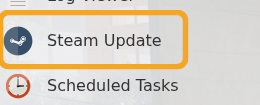
Use Steam Update when Satisfactory releases a dedicated server update, when players see a version mismatch, or when you need to repair the server files.

  1. Open your Satisfactory server in the control panel.
  2. Click Backup Server first if the current save matters.
  3. Click Steam Update.

    Satisfactory control panel showing Steam Update

  4. Wait for the Steam update task to finish.
  5. Start or restart the server.
  6. If the server still shows an error after updating, check the latest logs and submit a support ticket with the output.

  • 0 Пользователи нашли это полезным
Помог ли вам данный ответ?

Связанные статьи

How to join your Satisfactory server

Use the Connection Info address from the control panel when adding your Satisfactory dedicated...

How to backup your Satisfactory server

Create a Satisfactory backup before updating, uploading saves, changing config files, or...

How to restore a backup on your Satisfactory server

Restore a Satisfactory backup when you need to roll back after a failed update, config change,...

How to edit Satisfactory server configuration files

The main Satisfactory server setup is handled in-game through Server Manager, including...

How to upload a save to your Satisfactory server

Upload a Satisfactory save when you want the dedicated server to run a world from your own PC or...