Raid events send enemy groups against player bases. Disable raids if the server is meant to be relaxed PvE, if new players keep losing early bases, or if raids are causing performance issues around busy bases.

This does not remove wild Pals, bosses, dungeons, or normal world spawns. It only turns off base raid events.

  1. Open your Palworld server in the control panel.
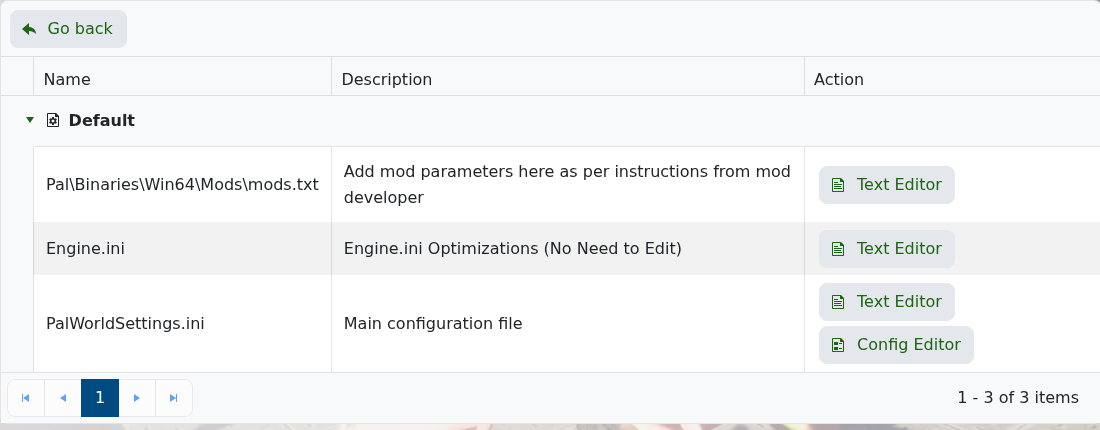
  2. Click Configuration Files.
  3. Open PalWorldSettings.ini with Config Editor.

    Palworld Configuration Files showing PalWorldSettings.ini Config Editor

  4. Scroll to the Player VS Player section.
  5. Untick Enable Raid Events?.

    Palworld Config Editor showing the Enable Raid Events setting

  6. Click Save & Exit, then restart the server.

If you are disabling raids because the server struggles during attacks, also review base size, assigned Pals, dropped items, and server RAM. Take a backup before changing several balance settings at once: How to Backup your Palworld Server.


  • 0 Пользователи нашли это полезным
Помог ли вам данный ответ?

Связанные статьи

What are the admin commands for a Palworld server

Palworld admin commands let you save the world, broadcast messages, kick or ban players,...

How to ban or unban players on your Palworld server

Ban disruptive players by using the in-game admin command or by adding their SteamID to the...

Adding a password to your Palworld Server

Add a server password when you want your Palworld server to be private or limited to invited...

How to edit the Configuration Files on your Palworld server

Most Palworld server settings are changed from PalWorldSettings.ini. Use Config Editor for common...

How to join a Palworld server

Use the Palworld multiplayer menu to search for your server by name, or use direct connect with...