
PvP allows players to fight each other on the Palworld server. Enable it only if your community wants player-versus-player combat, and check the nearby damage/drop settings before restarting.
- Open your Palworld server in the control panel.
- Click Configuration Files.
- Open
PalWorldSettings.iniwith Config Editor.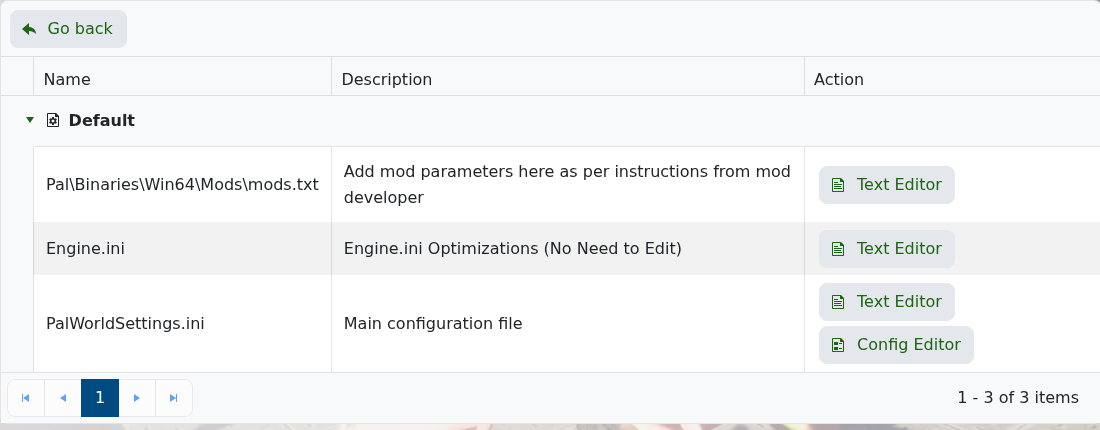
- Scroll to the Player VS Player section.
- Tick PvP Enabled?.
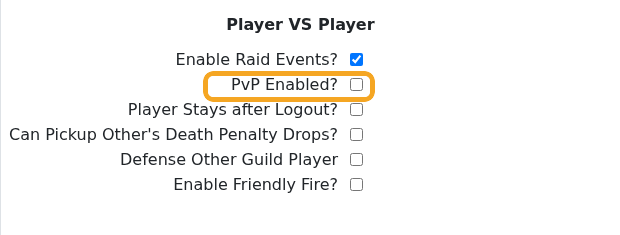
- Review nearby options such as death penalty drops, friendly fire, and guild damage rules.
- Click Save & Exit, then restart the server.
To turn PvP off later, untick PvP Enabled?, save, and restart again. Take a backup before changing combat rules on an active world: How to Backup your Palworld Server.


