Guilds are Palworld player groups used for shared progression and base ownership. On a dedicated server, guild limits and inactive-guild cleanup matter because they can affect long-running worlds with many groups.

The main guild controls are in PalWorldSettings.ini under Misc Options.

  1. Open your Palworld server in the control panel.
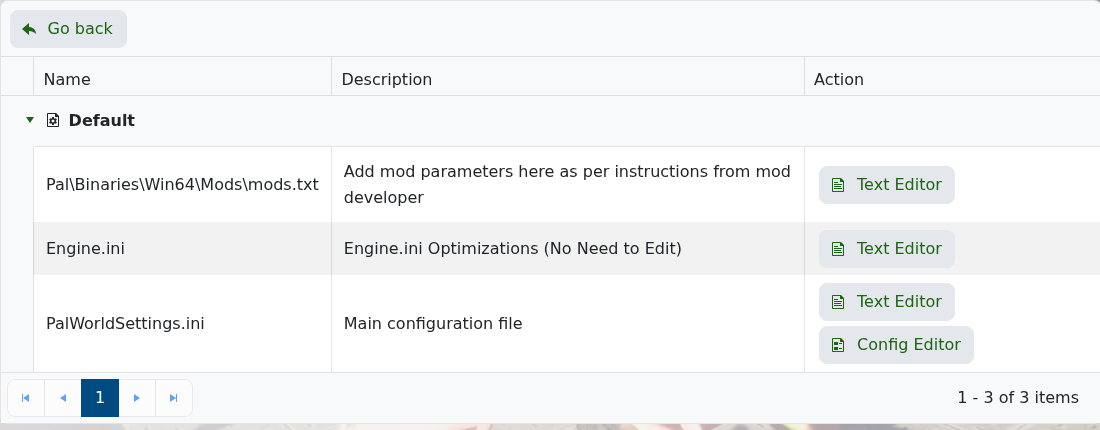
  2. Click Configuration Files.
  3. Open PalWorldSettings.ini with Config Editor.

    Palworld Configuration Files showing PalWorldSettings.ini Config Editor

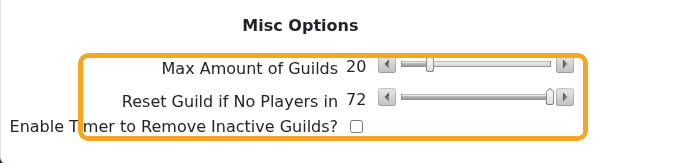
  4. Scroll to Misc Options.

    Palworld Config Editor showing guild limit and inactive guild settings

  5. Use Max Amount of Guilds to control how many guilds can exist.
  6. Use Reset Guild if No Players in and Enable Timer to Remove Inactive Guilds? only if you want inactive guild cleanup.
  7. Click Save & Exit, then restart the server if you changed anything.

Be careful reducing guild limits on an active server. If players already have established bases and guilds, take a backup first: How to Backup your Palworld Server.


  • 0 utilizatori au considerat informația utilă
Răspunsul a fost util?

Articole similare

What are the admin commands for a Palworld server

Palworld admin commands let you save the world, broadcast messages, kick or ban players,...

How to ban or unban players on your Palworld server

Ban disruptive players by using the in-game admin command or by adding their SteamID to the...

Adding a password to your Palworld Server

Add a server password when you want your Palworld server to be private or limited to invited...

How to edit the Configuration Files on your Palworld server

Most Palworld server settings are changed from PalWorldSettings.ini. Use Config Editor for common...

How to join a Palworld server

Use the Palworld multiplayer menu to search for your server by name, or use direct connect with...