Space Engineers loads the world named in SpaceEngineers-Dedicated.cfg. Use this guide when multiple worlds exist on the server and you want to switch which one starts.

Change The Active World

  1. Open your Space Engineers server in the control panel.
  2. Stop the server.
  3. Open File Manager and check the available world folders under worlds/Saves.
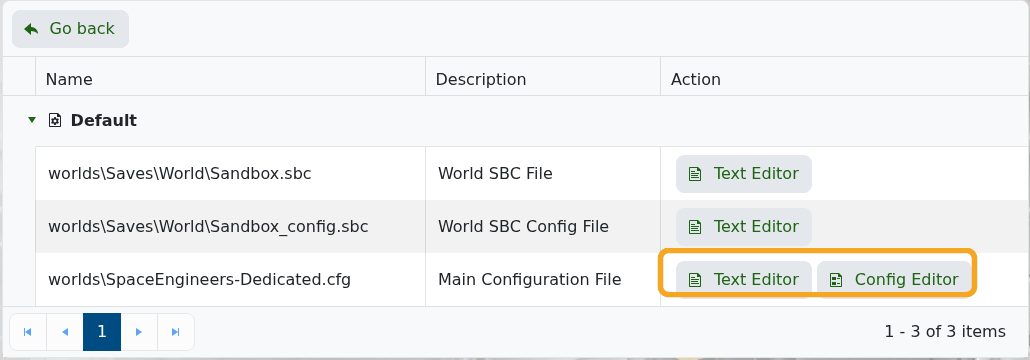
  4. Click Configuration Files.
  5. Open worlds\SpaceEngineers-Dedicated.cfg with Config Editor.

    Space Engineers Configuration Files showing Config Editor

  6. Change World Name to the exact folder name of the world you want to load.
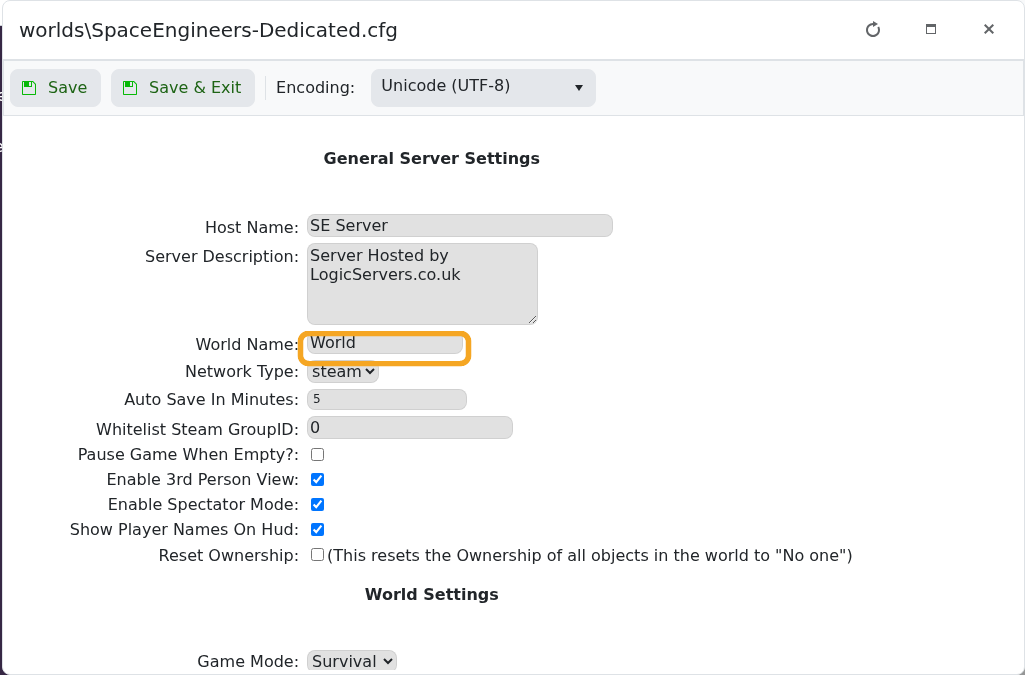
    Space Engineers Config Editor showing World Name

  7. Click Save & Exit, then start the server.

World folder names must match exactly. If the server creates a fresh world instead, recheck the folder name and confirm the save was uploaded into the correct worlds/Saves path.


  • 43 Korisnici koji smatraju članak korisnim
Je li Vam ovaj odgovor pomogao?

Vezani članci

Uploading a Space Engineers world to your server

Upload a Space Engineers world when you want to move a single-player or locally hosted save onto...

Wiping the world of your Space Engineers server

Wiping a Space Engineers server removes selected server data so the server can start fresh....

How to join a Space Engineers server

You can join a Space Engineers server by using the connection address from your control panel....

Adding Group Whitelist in Space Engineers

Space Engineers whitelisting is handled with a Steam group. When a Steam Group ID is set, only...

Adding Yourself as an Admin in Space Engineers

Space Engineers admins can use the in-game admin tools to manage players, entities, trash...