
To introduce the Arma 3 DLC SOGPF (Prairie Fire) onto your server, a few steps await your attention.
Be sure to stop your server operations and perform a backup to keep things secure.Â
Â
-
Access the Steam Console
- In your internet browser's address bar, type
steam://nav/consoleand press enter. - Select the Steam Client Bootstrapper from the options presented, which will open up the Steam Console. This is where the magic happens!
- In your internet browser's address bar, type
-
Download the DLC
- Armed with the Steam Console, you can now download the DLC. Take note of the following information:
- App ID: 233780 (Arma server)
- Depot ID (SOGPF): 233790 (Arma 3 Creator DLC SOGPF)
- Depot ID (Global Mobilization): 233787 (Arma 3 Global Mobilization)
- Armed with the Steam Console, you can now download the DLC. Take note of the following information:
-
Check Manifest Numbers
- To stay updated with the current manifest numbers, visit the following links:
- Global Mobilization (GM): SteamDB depot 233787 manifests
- SOG Prairie Fire (SOGPF): SteamDB depot 233790 manifests
- To stay updated with the current manifest numbers, visit the following links:
-
Begin Download
- For Global Mobilization, execute the following command in the Steam Console:
download_depot 233780 233787 5132611187809370715 - Press enter, and watch the console diligently as it diligently downloads the DLC.
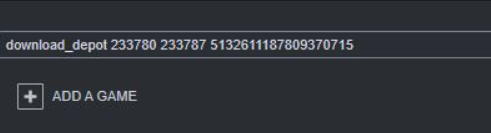
- For Global Mobilization, execute the following command in the Steam Console:
-
Locate the Download
- Once the download is complete it will show a link to the folder where its stored the depot download. Navigate to that folder.
-
FTP Transfer
- Next you will need to FTP to your server using Filezilla Client. We also have a Kowledgebase article on how to do that here.
- You will need to upload the folders inside the depot you just downloaded to your server in the root directory of your server right next to where your mods go. The files for Global Mobilization will look like this :

-
Activate DLC in TCAdmin
- Once that is uploaded to the server you will need to go to your TCAdmin control panel and click on Commandline Manager.
- Enter gm; in the Server Mods box and click Apply.
- For SOG Prairie fire you enter vn; instead.
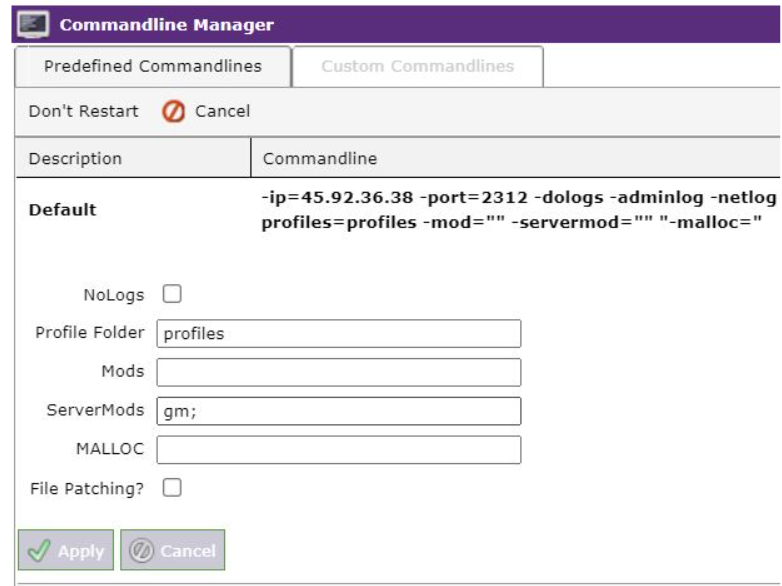
Â
Your server is now primed and ready to be restarted. You're all set to dive into the world of Arma 3 with your game server with the added DLC content. Enjoy the enhanced gaming experience with the Arma 3 DLC SOGPF (Prairie Fire) on your server.


