
You can upload a local Dragonwilds save to the server using the File Manager. If the save is large, use SFTP instead of the browser uploader: How to connect to SFTP using FileZilla.

Upload the save

  1. Take a backup of the server first.
  2. Stop the server.
  3. Open File Manager.
  4. Open RSDragonwilds, then Saved, then SaveGames.
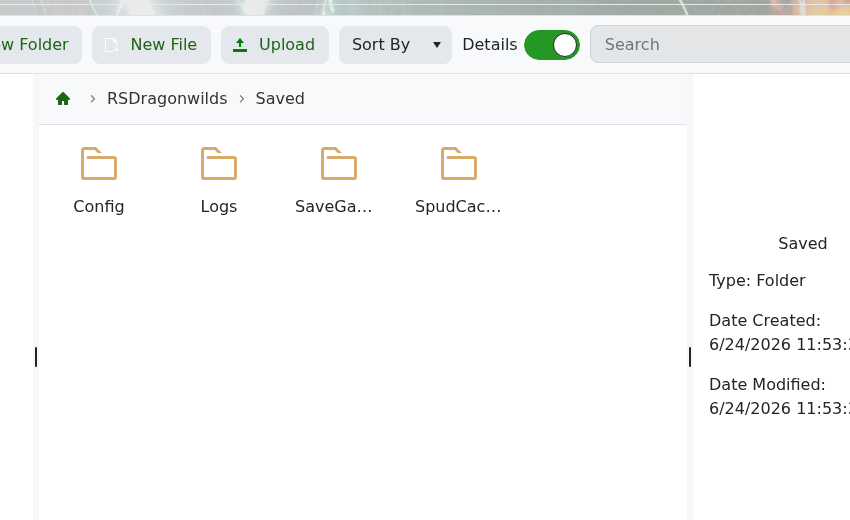
    Dragonwilds Saved folder with SaveGames

  5. Upload your save files into the correct save folder.
  6. Start the server again.

If you are replacing an existing world, keep a backup of the original save folder until you have confirmed the uploaded world works.


  • 0 Los usuarios encontraron esto útil
¿Le ha resultado útil esta respuesta?

Artículos relacionados

How to backup your Dragonwilds Server

Dragonwilds servers include scheduled backups, but it is still worth taking a manual backup...

How to restore your Dragonwilds Server from a backup

You can restore a Dragonwilds backup if a setting change, mod install, update, or world change...

How to join a Dragonwilds Server

You can find your Dragonwilds server connection details on the server home page in the control...

How to Change Your Dragonwilds Username

Dragonwilds player names are handled by the game client rather than the server control panel. If...

Dragonwilds Server RAM Recommendations

The right RAM amount for a Dragonwilds server depends on player count, world activity, mods, and...
