
ASKA does not currently expose a separate player-save interval in the control panel. The save interval available for the server is Auto Save, which writes to autosave style inside server properties.txt.

  1. Open your ASKA server in the control panel, then click Configuration Files.
  2. Click Config Editor next to server properties.txt.
  3. Use Auto Save to choose how often the server saves.
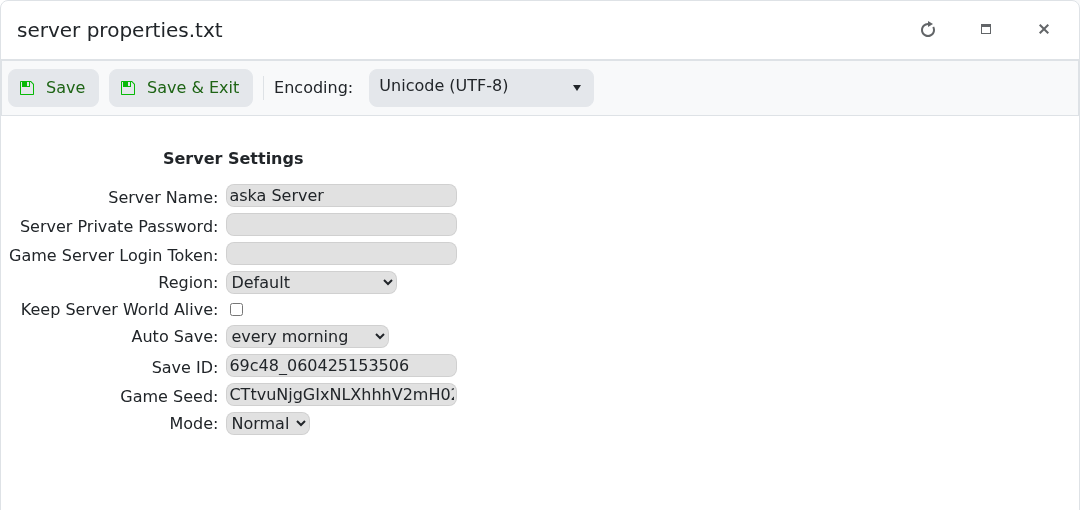
    ASKA Config Editor showing Auto Save

  4. Click Save & Exit, then restart the server.

If a player appears to roll back while the world looks correct, use a shorter autosave interval and give ASKA time to complete its next autosave before restarting the server.


  • 0 gebruikers vonden dit artikel nuttig
Was dit antwoord nuttig?

Gerelateerde artikelen

How to backup your ASKA Server

Backing up your server is essential, it allows you to rollback if something goes wrong and gives...

Changing settings on your ASKA server

Customising a server is a big part of owning a private game server, allowing you to get exactly...

Adding a GSLT to your ASKA server

ASKA game servers require a Game Server Login Token (GSLT) in order for the server to run. This...

How to find your ASKA Server in game

In ASKA, build and sustain a powerful Viking tribe where you and your villagers work, craft,...

How to keep your ASKA server running with no one online

ASKA can unload the world when the last player leaves. Turn on Keep Server World Alive if you...
