Server-side Arma 3 mods are loaded by the server but are not usually required on the player's client. These should use the -servermod startup option rather than the normal -mod list.

  1. Install or upload the server-side mod files.
  2. Open your Arma 3 server in the control panel.
  3. Click Commandline Manager.
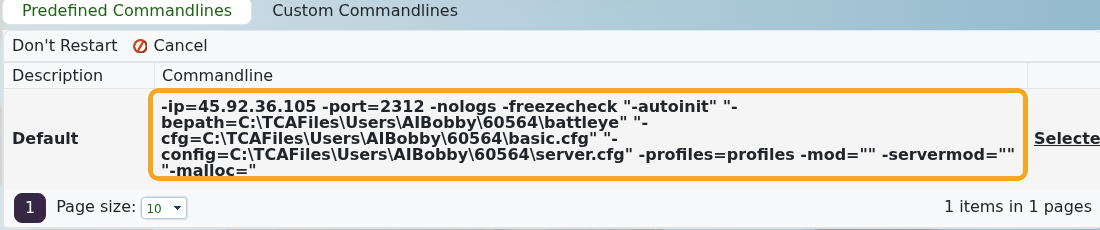
  4. Review the selected command line. If you need to edit startup values, create or edit a custom command line first: How to create a custom command line for your Arma 3 server.
  5. Add server-only mod folders to -servermod. Keep normal client mods in -mod.

    Arma 3 command line showing servermod and mod options

  6. Select the command line if it is not already selected.
  7. Restart the server.

Example:

-mod="@CBA_A3;@ace" -servermod="@serverTools"

Use -mod for mods players must also load. Use -servermod for server-only tools, headless/server utilities, and mods the client should not be asked to load.


  • 0 Utilizadores acharam útil
Esta resposta foi útil?

Artigos Relacionados

Adding and running a mission on your Arma 3 server

Arma 3 multiplayer missions are usually uploaded as .pbo files into the MPMissions folder. After...

Installing workshop mods to your ARMA 3 server

Install Arma 3 Workshop mods from the control panel, then make sure the server command line loads...

ARMA3 Server mods not showing on game launcher

If Arma 3 launcher only shows some of your server mods, the server may not be sending enough mod...

How to add creator DLCs to an Arma3 server

Some Arma 3 Creator DLC content needs dedicated server files and a matching startup parameter...

How to join an Arma 3 server

You can join your Arma 3 server by using the connection address from your control panel. Arma 3...