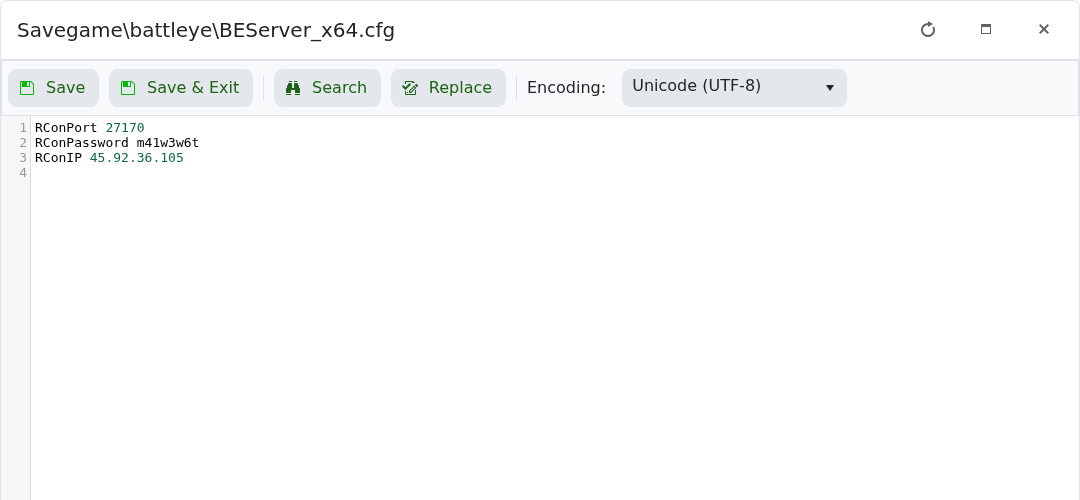
BattlEye RCON settings are stored in Savegame\battleye\BEServer_x64.cfg. Use this if an external RCON tool needs the Reforger RCON address, port, and password.

  1. Open your Arma Reforger server in the control panel.
  2. Click Configuration Files.
  3. Open Savegame\battleye\BEServer_x64.cfg with Text Editor.

    Arma Reforger BEServer_x64.cfg Text Editor showing RCON settings

  4. Set RConPort to the RCON port shown in the control panel.
  5. Set RConPassword to a private password.
  6. Set RConIP to the server IP if required.
  7. Click Save & Exit, then restart the server.

Keep the RCON password private. Anyone with the RCON address and password may be able to run remote server commands.


  • 0 Utenti hanno trovato utile questa risposta
Hai trovato utile questa risposta?

Articoli Correlati

How to join an Arma Reforger server

You can join your Arma Reforger server by using the server address shown in your control panel....

How to update your Arma Reforger server

Use Steam Update when Arma Reforger releases a server update or when your client reports that the...

How to backup your Arma Reforger server

Create a backup before changing scenarios, editing server_config.json, adding mods, changing RCON...

How to restore a backup on your Arma Reforger server

Restore a backup when you need to roll back after a broken update, bad JSON edit, unwanted...

How to change your Arma Reforger server name and password

The Arma Reforger server name and password are stored in server_config.json. Use the Config...