
SSH keys let you log in to a Linux VPS without relying only on a password. They are safer for long-term server access and are useful for administrators who connect often.
An SSH key has two parts: a private key that stays on your computer, and a public key that can be added to the VPS or VPS panel.
Never paste or upload your private key. Keep a working password or console route until you have tested the key.
Create an SSH key
On Linux, macOS, or modern Windows Terminal, you can create a key with:
ssh-keygen -t ed25519
Press Enter to accept the default save location unless you already manage multiple keys.
Use a passphrase if the key will be stored on a device used by other people.
Add the public key
- Open your VPS service from the client area.
- Open the VPS control panel.
- Click SSH Keys.
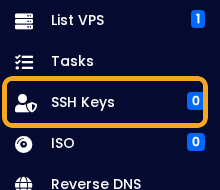
- Add the public key, not the private key.
- The public key usually ends in
.pub. - Save the key, then use it when connecting by SSH.
Only disable password logins after confirming SSH key login works.
For the SSH connection command, use How to connect to a Linux VPS with SSH.


