
Crossplay controls which platforms are allowed to connect to your Palworld server. In the control panel this is changed in PalWorldSettings.ini using the Crossplay Platforms field.
Only list the platforms you actually want to support. Players still need compatible game versions after Palworld updates.
- Open your Palworld server in the control panel.
- Click Configuration Files.
- Find
PalWorldSettings.ini, then click Config Editor.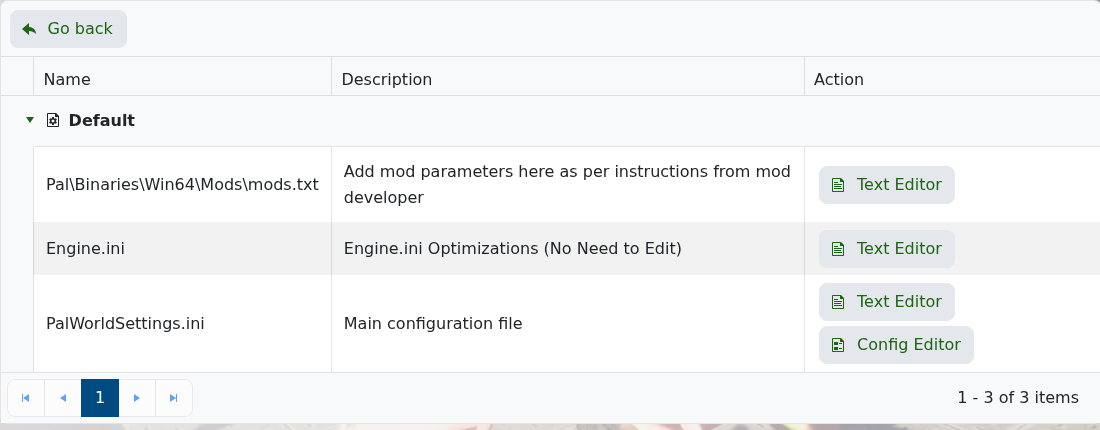
- Find Crossplay Platforms.
- Enter the platforms you want to allow, separated by commas. For example:
Steam,Xbox,PS5,Mac.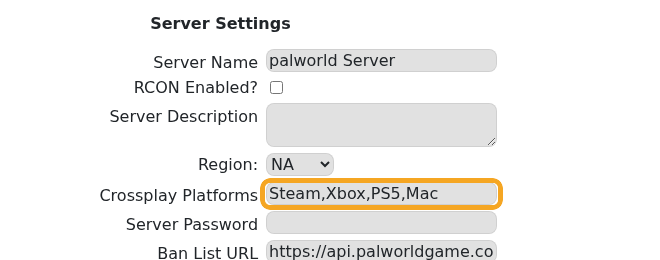
- Click Save & Exit.

- Restart the server so Palworld reloads the platform list.
If players still cannot join after crossplay is changed, update the server and ask players to update their game client as well: How to update your Palworld server.


