
Crossplay controls which platforms are allowed to connect to your Palworld server. In the control panel this is changed in PalWorldSettings.ini using the Crossplay Platforms field.

Only list the platforms you actually want to support. Players still need compatible game versions after Palworld updates.

  1. Open your Palworld server in the control panel.
  2. Click Configuration Files.
  3. Find PalWorldSettings.ini, then click Config Editor.
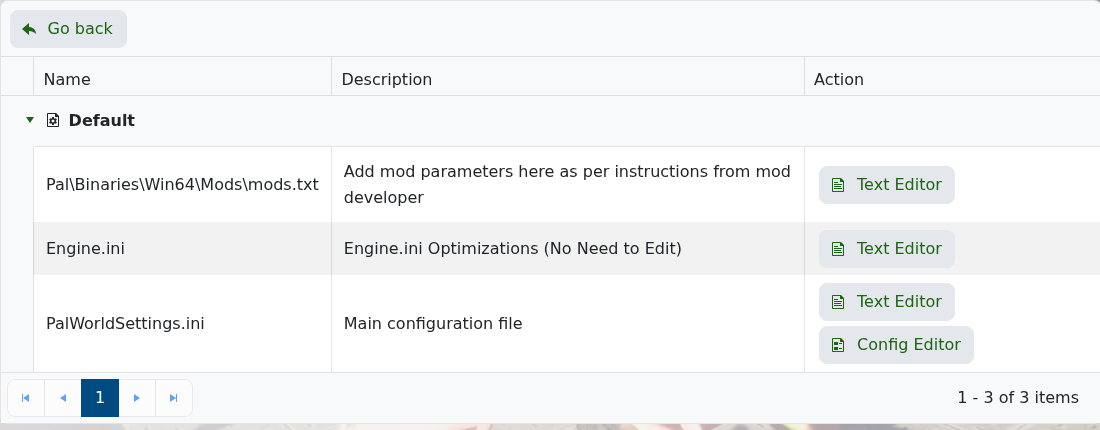
    Palworld Configuration Files showing PalWorldSettings.ini Config Editor

  4. Find Crossplay Platforms.
  5. Enter the platforms you want to allow, separated by commas. For example: Steam,Xbox,PS5,Mac.
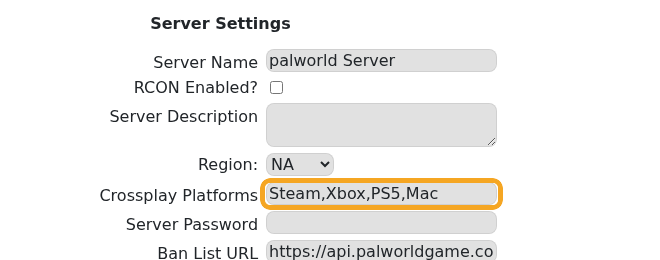
    Palworld Config Editor showing the Crossplay Platforms field

  6. Click Save & Exit.

    Palworld Config Editor Save and Save Exit buttons

  7. Restart the server so Palworld reloads the platform list.

If players still cannot join after crossplay is changed, update the server and ask players to update their game client as well: How to update your Palworld server.


  • 0 Korisnici koji smatraju članak korisnim
Je li Vam ovaj odgovor pomogao?

Vezani članci

What are the admin commands for a Palworld server

Palworld admin commands let you save the world, broadcast messages, kick or ban players,...

How to ban or unban players on your Palworld server

Ban disruptive players by using the in-game admin command or by adding their SteamID to the...

Adding a password to your Palworld Server

Add a server password when you want your Palworld server to be private or limited to invited...

How to edit the Configuration Files on your Palworld server

Most Palworld server settings are changed from PalWorldSettings.ini. Use Config Editor for common...

How to join a Palworld server

Use the Palworld multiplayer menu to search for your server by name, or use direct connect with...

