
You can upload an existing Empyrion save by placing the save folder inside Saves/Games and then setting GameName in server.yaml to match that folder name. The folder name and GameName must match exactly.
Upload Your Save
- Take a backup first: How to backup your Empyrion server save.
- Stop the server.
- Open File Manager.
- Go to
Saves/Games. - Upload your save folder into
Games. If you upload a ZIP file, extract it so the final path looks likeSaves/Games/YourSaveName.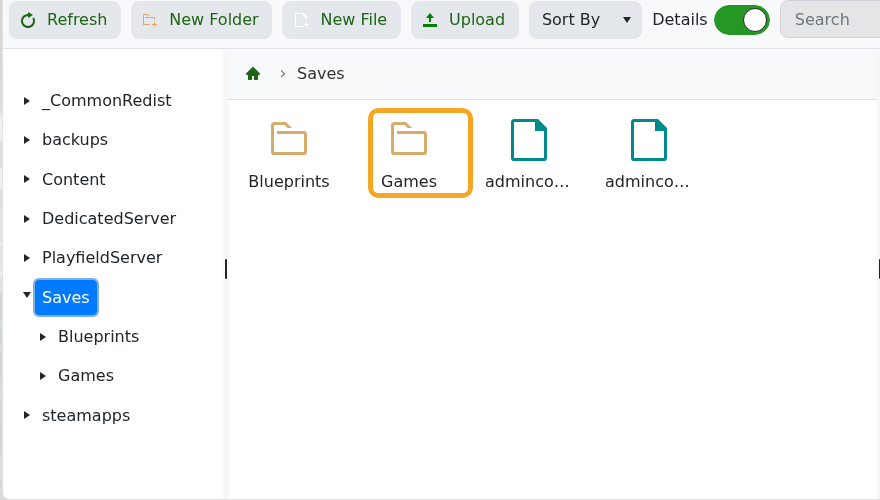
Set The Active Save Name
- Click Configuration Files.
- Open
server.yamlwith Text Editor. - Find the
GameConfigsection. - Set
GameNameto the folder name you uploaded. - Click Save & Exit, then start the server.
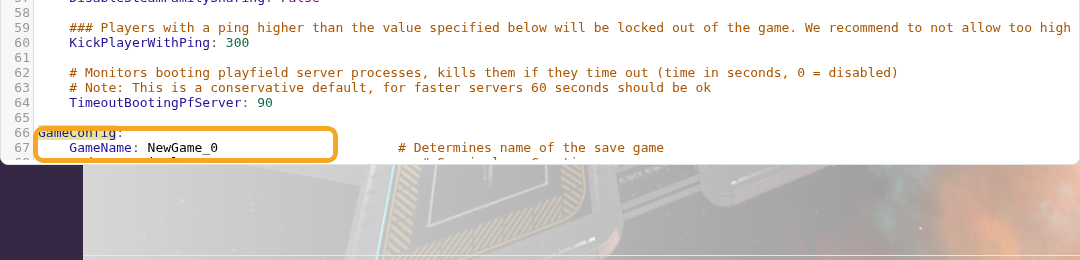
GameConfig:
  GameName: YourSaveName
  Mode: Survival
If the server creates a new empty world, the uploaded folder name and GameName do not match, or the save folder was uploaded inside an extra nested folder. Stop the server, correct the path, then start again.


